Recorded package
The selected RT10 record states 10 vials per box, with 10 mg per vial. Requested boxes remain a separate quantity.
Keep purchasing information specific enough to check.
Quenna’s catalog presents the recorded name, complete SKU, per-vial content and packaging for each listed specification. Original report links are included only where a file is registered to that full code.
The product listing identifies which original file is registered for a SKU. The PDF remains the source for the statements, identifiers and measurements actually printed in that document.
For an entry without a registered file, ask the team to confirm the documents required for your purchasing review. Do not replace it with a report for another code or specification.
These are purchasing review points for a clear sourcing request. They describe how to read the catalog and prepare your inquiry.
Retain the source catalog wording, qualifiers and named component amounts. Similar names remain independent product records.
Copy the entire recorded code, including letter order, case and any non-Latin characters. A nearby code does not identify the same entry.
Read the amount and unit together. Product-name numbers are distinct from the selected per-vial specification.
Read the package fields for the selected SKU. The package identifies its sales unit and vials per box.
Give each SKU its own quantity in boxes. Do not use a content amount in mg, mcg or ml as the number of packages.
Open the original PDF only where the catalog registers a file for that exact SKU. Other entries remain documents to confirm.
Review the original file and ask about its relevance to the proposed supply. A registered report is not a statement about every supplied batch.
Provide the country and the address details needed for routing. Recorded transit estimates are historical and do not confirm every address.
Have the team confirm current supply, pricing, order requirements and requested documents for the separately identified sourcing lines.
| Information | Where to review it |
|---|---|
| Name, SKU, per-vial content and packaging | Product page and the selected specification. |
| Registered original PDF and first-page preview | Product COA section and the COA library. |
| Report statements and document identifiers | The complete original PDF, with any questions sent to the team. |
| Historical destination estimates and route limits | Shipping page, followed by current country and address confirmation. |
| Current supply, price, order and document requirements | The team’s written review of your quotation request. |
Each review step answers a specific question about the item and request. Use the catalog, complete file and team’s quotation for the information each actually provides.
| Review step | Purpose |
|---|---|
| Select the complete catalog entry | Match the full name, exact SKU and recorded per-vial amount before comparing quotes. |
| Read the selected packaging fields | Keep the sales unit and vials per box separate from content per vial and requested boxes. |
| Open the registered original PDF | Use the file link attached to that full SKU and inspect all pages. The image preview is only its first page. |
| Keep the document identifiers | Read names, dates and any report or verification identifiers actually printed in the file. |
| Ask about proposed supply | Have the team confirm current requirements and the relevance of documents to the quote under discussion. |
Review the actual contents of the selected document. The presence of a field in another report does not supply that field for this entry.
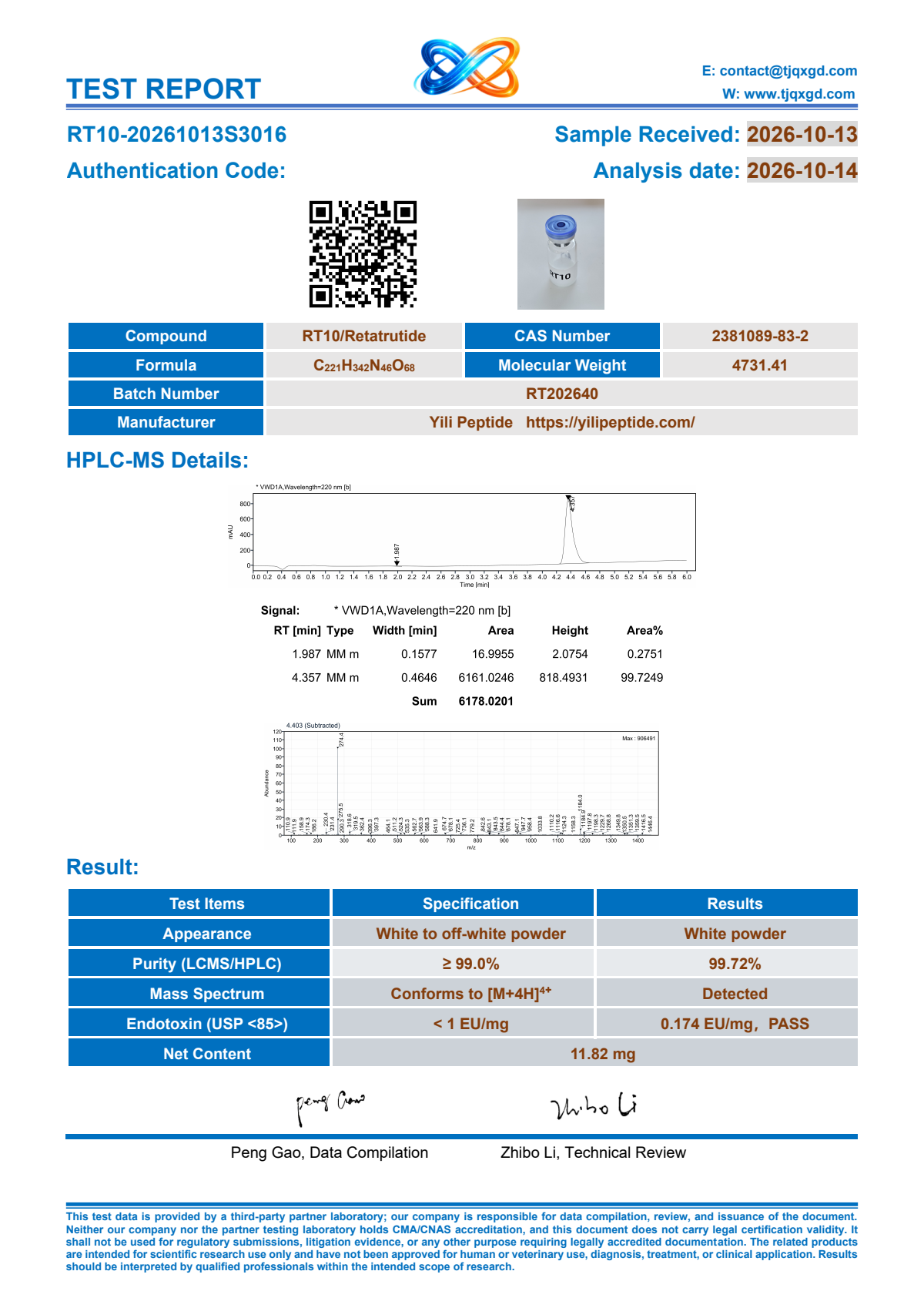 Original RT10 report · first-page preview
Use these questions to identify details that need clarification. They are purchasing checks, not a verdict about a document or its issuing party.
| Review point | Question to resolve |
|---|---|
| A similar name or code appears in the file | Does this document identify the exact SKU and per-vial specification being quoted? |
| A required field is absent or unclear | Can the team confirm the information or provide relevant documentation for the proposed supply? |
| A date or identifier is hard to match | Which original record is being discussed, and what is its relevance to the quotation? |
| The same file appears beside another amount | Which complete SKU is the file registered to? Keep other entries at their own document status. |
| Only an image preview has been reviewed | Has the complete original PDF been opened, including any further pages? |
| Verification details need clarification | What source or verification route is actually stated in this document? Ask about details that remain unresolved. |
Keep the recorded package separate from the physical shipment and any handling documentation you need to review.
The selected RT10 record states 10 vials per box, with 10 mg per vial. Requested boxes remain a separate quantity.
Ask about written packaging or label requirements for the exact entry. Include the full SKU and inquiry details when raising a question about a real item.
Request the information required for your purchasing review and proposed supply. The team confirms the relevant documents for that request.
List the paperwork your organization and destination require. The team confirms availability and relevance for the proposed purchase.
A separately identified product list makes the answers useful for the quote you are comparing.
Resolve these points for the exact catalog entry and quotation under discussion.
Select the complete SKU, compare its recorded name and per-vial specification, and open any original PDF registered for that exact entry. Use the COA lookup guide to keep the catalog and file records distinct.
Read only the statements actually included in the original file. Identify any further documentation required for your purchasing review and ask the team to confirm its availability and relevance. The catalog adds no unprovided testing promise.
The registered original PDF links are public in the COA library and on the relevant product page. Other SKUs are shown as documents to confirm.
Read any issuer, report identifier and verification route printed in the original PDF. Ask the team to clarify information that is missing or unclear and its relevance to proposed supply.
Use the illustration to identify the Quenna presentation, then review the written specification and required packaging documentation with the team. Send any real label or container question with the complete SKU and inquiry details.
Ask for documentation relevant to the exact SKU and proposed supply. The purchasing catalog does not supply a preparation procedure or create a storage-duration promise.
List the paperwork your organization and destination require in the inquiry. The team confirms what is available and relevant for that quotation rather than extending a registered file to every shipment.
Open the original file, keep its SKU and scope in view, and ask the team to confirm the details relevant to your purchase.